Roofing Lead Scoring: Prioritize High-Value Jobs Fast
Use a hybrid points-based model that combines fit signals (property type, insurance status, zip-code hotness) with engagement signals (phone verification, form completeness, web behavior) and roofing-specific triggers (storm-verified damage, insurance intent, stated timeline). That combination is the fastest way to route your best jobs to sales before a competitor picks up the phone.
Here is the scoring-action map to run from day one:
- Hot lead: Call promptly, assign to your top closer, flag for same-day estimate.
- Warm lead: Same-day SMS and email, route to bid team promptly.
- Cold lead: Enter automated nurture drip, re-score after a period of engagement.
The five signals that carry the most weight in roofing:
- Storm-verified damage in the lead’s zip code
- Stated insurance claim intent
- Phone number answered or verified
- Property type (single-family owner-occupied)
- Timeline under a typical short-term range
Pro Tip: Before you route a single live lead by score, run your model against at least one batch of historical leads where you already know the outcome. Adjust weights until the model would have correctly identified your closed jobs. Skipping this step is the single most common reason scoring models fail in the first 90 days.
Key Takeaways
A hybrid points-based roofing lead scoring model combining fit, engagement, and storm-specific signals is the most direct path to higher close rates and faster sales response times.
| Point | Details |
|---|---|
| Use a hybrid scoring model | Combine fit, engagement, and roofing-specific signals for the most accurate lead prioritization. |
| Validate before going live | Run your model against historical leads with known outcomes before routing any live traffic. |
| Weight phone verification highest | A verified answered call is the single strongest engagement signal in roofing lead scoring. |
| Update zip weights after storms | Recalibrate storm-zone point values within 24 hours of a named weather event using current data. |
| Areions delivers pre-qualified leads | Areions’ managed storm-response program routes human-verified, scored leads directly into your CRM. |
Primary sources and further reading
- What Is Lead Scoring? — Oracle: foundational definition of fit vs. engagement scoring and how numeric values are assigned to prospect signals.
- How to Calculate Lead Score — RudderStack: practical calculation method using weighted sums and percentile conversion for routing thresholds.
- Lead Qualification AI Guide for Roofing — Arahi AI: roofing-specific guidance on consistent data collection, historical validation, and scoring agent inputs.
- Strategies for Improving Marketing ROI and Lead Generation — Marvin Growth Partners: ROI case for score-driven budget allocation and campaign targeting for small businesses.
- Lead Codes Explained — Ashbrook Roofing Supplies: clarifies that “lead codes” in roofing materials refer to weight per square foot, not sales lead classification.
Table of Contents
- What lead scoring means for roofing companies
- Why roofing companies see measurable gains from lead scoring
- Roofing-specific scoring attributes and recommended point ranges
- Step-by-step: build your points-based scoring model
- How a lead score is calculated: a worked example
- Operational playbook: what to do at each score band
- How to validate, monitor, and recalibrate your scoring model
- Sample scoring template you can copy today
- Areions case study: implementing lead scoring in a storm-response program
- What most roofing teams get wrong with lead scoring
- Qualified storm-response leads, delivered to your CRM
- Sources
What lead scoring means for roofing companies
Lead scoring assigns numeric values to prospects using demographic and behavioral signals so your team can prioritize higher-propensity buyers instead of working every lead with equal effort.
For roofing, the model runs on two axes: fit and engagement.
Fit signals describe who the prospect is:
- Property type (single-family vs. multi-unit vs. commercial) as applicable
- Homeownership status
- Insurance carrier and claim intent
- Service territory or zip code
- Estimated job size based on roof area or storm damage severity
Engagement signals describe what the prospect did:
- Answered a verification call
- Completed a full form (vs. partial)
- Visited the estimate or pricing page
- Responded to an SMS within 15 minutes
- Clicked a storm-damage ad (vs. organic browse)
Consider two leads with identical fit scores: both are single-family homeowners in a storm-hit zip with insurance. Lead A answered the verification call and submitted a complete form. Lead B left the phone field blank and bounced after 20 seconds. Same fit, very different intent. Engagement scoring is what separates them.
Pro Tip: Weight engagement signals at a significant portion of the total score for roofing. Fit tells you if the job is worth doing; engagement tells you if the homeowner is ready to move.
Why roofing companies see measurable gains from lead scoring
Scoring raises marketing ROI by directing your sales effort toward the homeowners most likely to sign a contract, not just the ones who clicked an ad. Lead scoring improves marketing ROI by allowing campaigns to target higher-converting segments and allocate budget more effectively.
The operational benefits are direct:
- Fewer wasted follow-up calls on leads that were never going to convert
- Faster response to high-intent homeowners, which matters enormously in storm markets where three roofers may knock the same door within 48 hours
- Better ad budget allocation because scored data shows which sources produce hot leads vs. cold ones
- Shorter sales cycles because reps spend time on leads that are already pre-qualified
Speed-to-lead is one of the strongest predictors of conversion for trade services. A homeowner with verified storm damage who fills out a form at 9 AM and gets a call by 9:05 AM is far more likely to book an estimate than one who waits until afternoon. Scoring makes that 5-minute response automatic, not accidental.
Roofing-specific scoring attributes and recommended point ranges
Not all scoring variables are equal, and the roofing market has signals that generic B2B scoring models ignore entirely. The table below groups attributes by category with suggested point ranges you can adapt to your market.
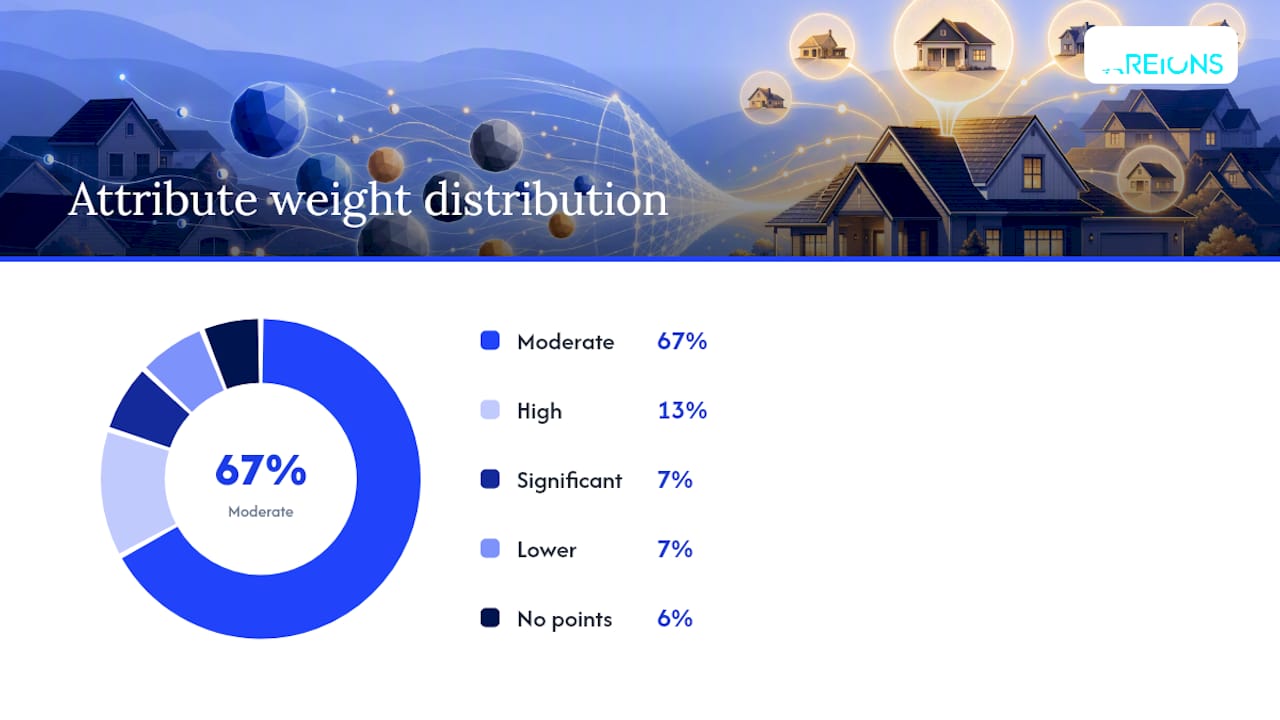
| Category | Attribute | Suggested Points |
|---|---|---|
| Fit | Single-family, owner-occupied | moderate points |
| Fit | Insurance claim intent stated | moderate points |
| Fit | Zip code in active storm zone | moderate points |
| Fit | Job size estimate over a high-value threshold | moderate points |
| Engagement | Phone number verified (answered) | moderate points |
| Engagement | Full form completed | moderate points |
| Engagement | Estimate page visited | lower points |
| Engagement | SMS response within a short time frame | moderate points |
| Roofing-specific | Storm damage verified by weather data | high points |
| Roofing-specific | Timeline within a short-term threshold | moderate points |
| Roofing-specific | Referral source (past customer or contractor) | significant points |
| Roofing-specific | Insurance adjuster meeting scheduled | high points |
| Lead source | Inbound call (vs. form fill) | moderate points |
| Lead source | Paid storm-response ad | moderate points |
| Lead source | Cold outbound or canvassing | no points |
Referral leads deserve a significant weight boost because they arrive with built-in trust and close at higher rates than cold ad traffic. A referral from a past customer should score at least as high as a verified phone answer.
Pro Tip: Zip-code hotness is not static. After a named storm, recalibrate your zip weights within 24 hours using NOAA storm reports or a weather-data API. A zip that scored 5 points yesterday may warrant 15 today.
Step-by-step: build your points-based scoring model
Building a scoring model is a one-time setup that pays back every week. Follow these steps in order.
- Document your ideal customer profile (ICP). List the property types, job sizes, insurance situations, and geographic zones that typically produce your best jobs. This is your fit baseline.
- Map every lead source. Catalog where leads come from: Google Ads, storm-response landing pages, referrals, canvassing, and organic search. Assign a base source weight to each.
- List all available data fields. Pull every field your forms, CRM, and call-tracking system currently capture. You can only score what you collect.
- Assign initial point values. Use the table in the previous section as a starting point. Weight roofing-specific signals (storm verification, insurance intent) highest.
- Set threshold bands. Define hot, warm, and cold cutoffs based on your score distributions.
- Integrate with your CRM. Create a numeric score field, set up automation rules to calculate and update the score on each lead record, and configure routing triggers.
- Run a historical validation pass. Before going live, run scoring rules against historical leads where outcomes are known to validate predictive value and adjust weights accordingly.
- Go live and monitor daily for two weeks. Track conversion rate by band, response time, and lead-to-job yield before making any threshold changes.
For teams with at least 500 historical leads and a CRM that supports custom fields, a predictive (machine learning) scoring layer is worth exploring. Predictive models analyze patterns across all your historical data to weight signals automatically. The tradeoff: they require clean, consistent historical data and a longer setup time. A rules-based points model is faster to deploy and easier to explain to your sales team.
Pro Tip: Consistent, structured data collection across every lead entry channel is the foundation of reliable scoring. A single missing field, like a blank phone number, can make a score unreliable and mis-route a hot lead to a nurture drip.
How a lead score is calculated: a worked example
A lead score is calculated as a weighted sum of individual criteria; adjusting weights prioritizes certain behaviors over others. Here is how that looks for a real roofing lead.
Fictional lead: Maria T., homeowner, Dallas suburb
Maria’s raw score is 120 out of the maximum possible score. Calculated percentile places her inside the hot band, triggering an immediate call.
Some scoring frameworks treat leads near the hot-band cutoff as warm leads requiring human review rather than automated routing to avoid misclassification. This prevents borderline leads from falling into a cold nurture sequence when a single phone call could push them to hot.
Common pitfalls when calculating scores:
- Double-counting: Giving points for both “insurance intent stated” and “insurance adjuster scheduled” on the same lead without checking whether they are the same signal in your form.
- Missing normalization: Comparing raw scores across leads when the maximum possible score differs (because some leads have more data fields captured than others).
- Static zip weights: Using the same zip-code hotness score year-round instead of updating after storm events.
Operational playbook: what to do at each score band
A score without a routing rule is just a number. Each band needs a defined owner, a time-to-first-contact standard, and a fallback if the first contact fails.
Hot (75+ points):
- Owner: senior sales rep or business development rep
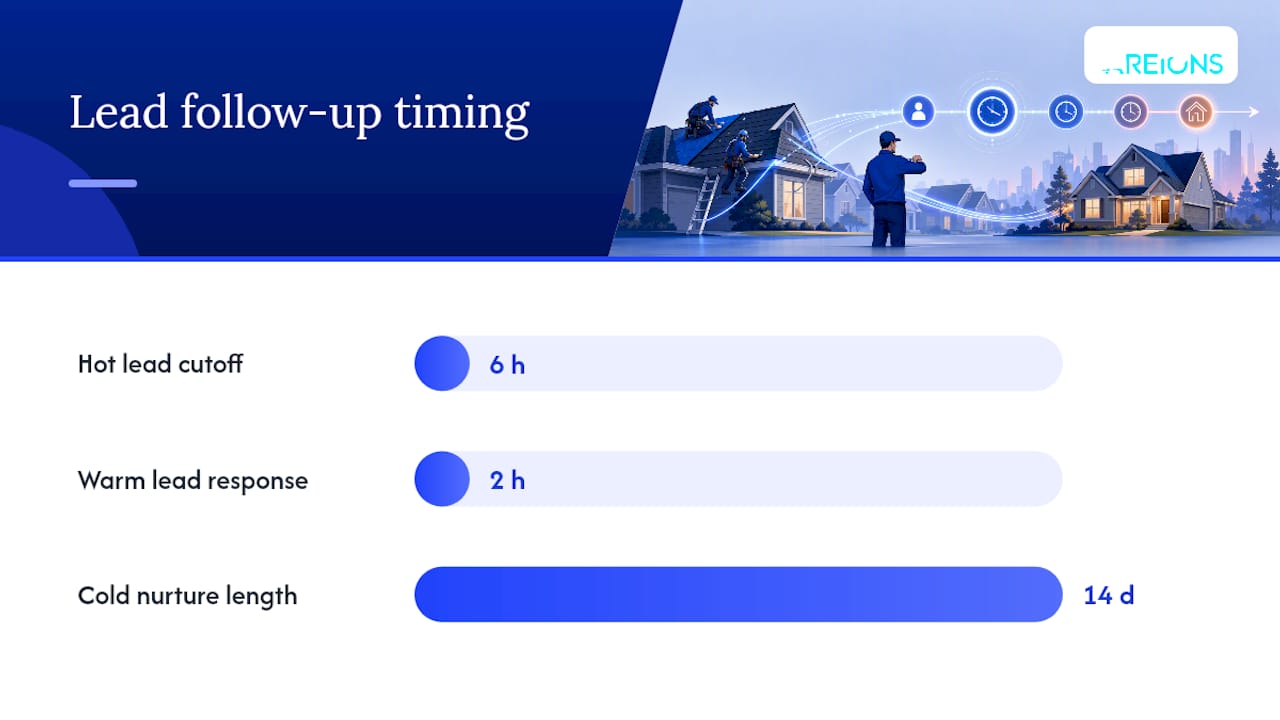
- Time to first contact: 5 minutes or less from lead creation
- Action: live phone call, then immediate SMS if no answer; schedule estimate within 24 hours
- Storm-response note: flag for territory exclusivity check before routing to avoid duplicate outreach
Warm (45–74 points):
- Owner: bid team or second-tier rep
- Time to first contact: within 2 hours
- Action: SMS first, then email with estimate booking link; follow up by phone end of business day
- If no response in 48 hours, re-score and move to nurture
Cold leads:
- Owner: automated nurture sequence
- Action: 5-touch email and SMS drip over 14 days; re-score after each engagement event
- If score crosses 45 after nurture engagement, escalate to warm routing immediately
Speed to first contact is critical because homeowners submitting storm-damage forms often speak to multiple contractors. The first roofer to call and verify damage usually wins the estimate appointment, as conversion chances drop quickly after initial contact delays.
Segmented nurture and remarketing pair well with score-driven routing to improve long-term conversion rates for cold leads who re-engage weeks after the initial contact.
How to validate, monitor, and recalibrate your scoring model
Launching a scoring model without validation is the equivalent of setting routing rules based on a guess. Running scoring rules against historical leads where outcomes are known is the standard practice for validating predictive value before going live.
Testing checklist before launch:
- Pull at least 3 months of historical leads with known outcomes (closed, lost, no-show).
- Apply your scoring model to each historical lead and record the predicted band.
- Measure how often hot-band leads actually closed vs. how often they were lost.
- Adjust weights until the model correctly identifies your closed jobs at a rate you find acceptable.
- Test routing logic in a staging environment before connecting to live lead flow.
Metrics to monitor after launch:
- Conversion rate by band: Hot leads should close at a materially higher rate than warm or cold.
- Response time by band: Confirm hot leads are actually being called within 5 minutes.
- Lead-to-job yield: Track how many scored leads become signed contracts, by source and by band.
- Score drift: Watch for bands that shift over time (e.g., more leads scoring hot after a storm than your team can handle).
Cadence recommendation: monitor daily for the first two weeks after launch, then weekly for the first quarter. Practical scoring models should be reviewed quarterly and updated when market conditions change, such as after a major storm season or when you add a new lead source.
Pro Tip: If your hot-band conversion rate drops below your warm-band rate, your hot threshold is too low. Raise it by 10 points and re-evaluate after two weeks. Threshold creep in the wrong direction is the most common sign that a model has drifted out of calibration.
Sample scoring template you can copy today
Use this table as your starting point. Import it into a spreadsheet or create matching fields in your CRM. Adjust point values based on your local market and the job sizes you typically close.
Maximum possible score: 145 points. Hot band: 75+. Warm band: 45–74. Cold band: below 45.
To adapt this template: if your market skews heavily toward insurance jobs, increase the insurance intent and adjuster meeting weights. If you operate in a hail corridor where storm verification is nearly universal, shift more weight toward engagement signals like phone verification and form completeness to differentiate within the hot band.
Areions case study: implementing lead scoring in a storm-response program
A roofing contractor in the mid-Atlantic region (anonymized) implemented a scoring model through Areions’ managed storm-response program. The setup timeline ran as follows.
Week 1–2: Areions configured the CRM fields, built the scoring automation, and connected call tracking. The contractor’s historical leads from the prior storm season were scored retroactively to validate initial weights.
Days 1–30: The model ran in parallel with the existing manual process. Reps received scored leads alongside their normal queue. Hot leads were flagged but routing was still manual.
Day 31 onward: Automated routing went live. Hot leads triggered an immediate call task assigned to the senior rep. Warm leads entered a 2-hour SMS-first sequence. Cold leads entered a 14-day nurture drip.
Implementation highlights:
- CRM sync was completed before any live leads entered the system, eliminating field mismatch errors.
- Human verification calls (a core part of Areions’ managed qualification process) added phone-verification points in real time, raising scores for leads that answered.
- Territory exclusivity rules were built into the routing logic so no lead was sent to two reps simultaneously.
- The scoring template was adjusted after the first major storm event to increase zip-code hotness weights for affected areas.
Pro Tip: During high-season storms, your hot band will fill faster than your team can handle. Pre-set a daily hot-lead capacity limit and route overflow to a secondary rep rather than letting hot leads age into warm. A 6-hour-old hot lead is no longer a hot lead.
What most roofing teams get wrong with lead scoring
The biggest mistake is launching a scoring model without historical validation. Teams build a point table, set thresholds, and go live, then wonder why the hot band is full of leads that never pick up the phone. The model looked logical on paper but was never tested against reality.
The second mistake is ignoring phone verification. A lead with a perfect fit score and a disconnected number is worth zero. Phone verification is the single highest-signal engagement event in roofing, and most teams underweight it because it feels like an operational step rather than a scoring input.
Third: over-weighting demographics and under-weighting behavior. Knowing that a homeowner lives in a single-family house in a storm zip tells you the job could exist. Knowing they answered a verification call, completed the form, and visited the estimate page tells you they want to move. Behavior predicts conversion; demographics predict eligibility.
For the first 30 days, three priorities matter most:
- Validate before routing. Score your last 90 days of historical leads and confirm the model would have identified your closed jobs.
- Protect phone verification as a top-weighted signal. If your current forms do not capture a verified phone, fix that before anything else.
- Monitor daily. The first two weeks of live scoring will reveal threshold problems that no amount of planning can anticipate. Watch the data, not the model.
Qualified storm-response leads, delivered to your CRM
Roofing lead scoring is only as good as the leads entering the model. If your pipeline is full of unverified, low-intent contacts from cold ad traffic, even a well-calibrated scoring model will spend most of its time routing leads to the nurture drip.
Areions solves the upstream problem. The service intercepts active demand from homeowners with verified storm damage, runs human qualification before a lead ever reaches your CRM, and routes only scored, verified contacts into your pipeline. There are no long-term contracts, the service runs month-to-month, and qualified leads arrive within 30 days of setup. Territory exclusivity means your team is not competing against another Areions client in the same zip code.
If you want a scoring model that works from day one because the leads feeding it are already pre-qualified, see how Areions works and request availability for your service area.
Sources
Scoring only works if the score lives in your CRM and updates automatically. A score sitting in a spreadsheet that someone checks manually is not a system.
- What is Lead Scoring? - Oracle
- How to Calculate Lead Score - RudderStack
- Lead Codes Explained - Ashbrook Roofing Supplies
Common CRM pitfalls to avoid:
Pro Tip: Tag every lead with its original source at creation and protect that tag from being overwritten by later touches. Source attribution is how you prove which ad campaigns produce hot leads vs. cold ones, and that data directly informs where to spend next month’s budget.