
Cut Junk Leads Now With 2 Roofing Lead Forms in an Afternoon
The best roofing lead forms qualify homeowners before collecting contact details, then hand off to a routing system reaching serious prospects within minutes. Screening first (ZIP, ownership, roof age, insurance status) filters out renters, tire kickers, and out-of-territory clicks before they hit your CRM. Pair that with a value-first tool, like an instant measurement widget, where feasible, and connect the form to live notifications. The payoff: fewer wasted truck rolls, a lower qualified cost per lead, and faster answers to homeowners who actually need a roof.
TL;DR:
- Screening-first lead forms with disqualifying questions at the start reduce unqualified submissions and improve lead quality.
- Asking for contact details only after qualifying questions helps prevent roofers from wasting time on ineligible homeowners.
- Using quick-start, progressive disclosure flow ensures a fast experience that maintains high conversion rates.
- Combining instant estimate widgets with classic forms allows coverage across paid ads and organic content without overengineering.
- Speeding up verification and routing immediately after form submission significantly increases the chances of capturing storm damage leads before competitors do.
Table of Contents
- What Fields Belong in a Roofing Lead Form (And in What Order)
- How Do You Build a Screening-First Flow Without Killing Conversion?
- Instant Estimate Widgets vs Classic Contact Forms: Which Wins?
- Verification and Routing: Turning a Form Fill Into a Live Conversation
- Two Ready-to-Use Roofing Lead Form Templates
- How Do You Measure Whether Your Form Actually Improved Lead Quality?
- Common Mistakes That Quietly Kill Roofing Lead Quality
- Why Storm-Response Leads Need a Different Triage Order
- Connecting Your Form to Marketing and Sales Tools Beyond the CRM
- Security Best Practices to Protect Lead Information
- What Roofing Contractors Get Wrong About Lead Forms
- Areions: Managed Storm-Response Lead Capture for Roofing Teams
- Sources
- FAQ
What Fields Belong in a Roofing Lead Form (And in What Order)
Field order decides whether your form filters junk or invites it. Put disqualifying questions first, contact fields last. A homeowner who is renting, lives outside your service area, or has no roof damage should hit a dead end before you ever ask for a phone number.
The sequence that protects conversion looks like this:
- ZIP or address with autocomplete to confirm service area instantly.
- Homeownership status because renters can’t authorize roof work.
- Project type (repair, full replacement, storm-related damage).
- Roof material and approximate age, since a 3-year-old roof rarely needs replacement.
- Insurance claim status, which changes your entire sales approach.
- Urgency or rough budget range to separate active buyers from researchers.
Contact fields, name, phone, email, come after all of that, not before. Optional add-ons like a photo upload or a preferred callback window sharpen qualification further without adding real friction. The Jotform Roofing Lead Intake Form template already builds this structure in, with address capture, roof-age fields, conditional logic, and file uploads ready to configure.
How Do You Build a Screening-First Flow Without Killing Conversion?
Screening-first works only if the early questions feel fast, not like an interrogation. The trick is progressive disclosure: ask one or two quick qualifiers, then reveal the next step only after the homeowner answers. Nobody sees a 12-field wall on load.
- Start with the two lightest questions. ZIP code and homeownership take five seconds to answer and immediately confirm fit.
- Branch based on the answer. If the homeowner mentions storm damage, surface insurance and occupancy questions. If not, skip straight to project type and roof age.
- Compress for paid traffic. A Google Ads landing page should never run a 10-step flow. Keep two or three qualifiers, ZIP and ownership at minimum, then move to contact.
- Set stop rules. If someone answers “I rent” or lands outside your territory, the form should end the flow gracefully rather than displaying a phone field that will only generate a lead you’ll toss.
Pro Tip: Build your stop rule as a soft redirect, not a blank screen. A line like “We currently don’t service this ZIP code, but here’s who might help” keeps the experience polite and protects your brand.
Leadcapture follows this exact logic: disqualifiers up front, contact fields reserved for homeowners who clear the screen.
Instant Estimate Widgets vs Classic Contact Forms: Which Wins?
Neither format is universally right. It depends on where the traffic comes from and how much friction the channel can absorb.
Value-first tools, generic instant measurement or satellite-estimate widgets that generate a rough roof size or price range before asking for contact info, tend to raise both conversion rate and lead seriousness. Homeowners who’ve already seen a number are further along than someone filling out a blank inquiry form. Background patterns across instant-measurement tools show this value exchange consistently outperforms a plain “request a quote” box on paid traffic, because the homeowner gets something before giving something.
Classic contact forms still earn their place. They’re simpler to build, cheaper to maintain, and perfectly fine on content pages, blog posts, or organic service pages where the visitor isn’t primed to buy yet.
| Approach | Best for | Qualification style | Integration needs |
|---|---|---|---|
| Instant measurement/estimate widget | Paid landing pages, storm campaigns | Value-first, contact after estimate | Pricing config, address lookup, PDF/report delivery |
| Classic screening-first contact form | Organic pages, content hubs, referral links | Screening-first, qualifiers before contact | CRM webhook, notification email/SMS |
A hybrid setup, widget on the ad landing page, screening form on the blog, covers both without overengineering either.
Verification and Routing: Turning a Form Fill Into a Live Conversation
A qualified form is worthless if the lead sits in an inbox for six hours. Speed to first contact is the single biggest lever roofers control after the form itself.
- Verify phone and email at capture. A soft format check catches typos instantly; escalate to live carrier verification for high-value leads like storm claims.
- Route in real time. Webhooks, SMS alerts, or a direct ping into your team’s messaging tool beat a daily email digest every time.
- Map answers to CRM fields with priority logic. A lead flagging insurance claim or storm damage should jump the queue ahead of a routine gutter repair inquiry.
- Monitor delivery. Set an alert for failed webhook deliveries and flag duplicate submissions before they clog your pipeline.
Tools built for post-capture follow-up, like TrailerCast’s sales workflow platform, can extend this further by handling video or async follow-up once a lead lands, useful when your team can’t call back the instant a form comes in.
Two Ready-to-Use Roofing Lead Form Templates
You don’t need to design a form from scratch. Two field-sets cover most use cases.
Compact template (fast capture, low friction):
- ZIP code
- Homeownership confirmation
- Project type (repair, replacement, storm)
- Optional photo upload
- Name, phone, email
Full template (screening-first, higher certainty):
- ZIP/address with autocomplete
- Homeownership status
- Roof material and approximate age
- Insurance claim status
- Urgency (emergency, within 30 days, just researching)
- Project type
- Photo upload
- Name, phone, email
Add one line of consent language near the submit button: “By submitting, you agree to be contacted about your roofing project.” Keep it short. Every field should stack vertically on mobile, use large tap targets, and label inputs clearly for screen readers. A real estimate-request page shows how to phrase project-type and square-footage fields in plain homeowner language, plus a response-time promise that sets expectations.
How Do You Measure Whether Your Form Actually Improved Lead Quality?
Track outcomes, not just submissions. A form that generates more fills but the same number of closed jobs hasn’t improved anything.
- Watch four KPIs: qualified cost per lead, verification pass rate, speed to first contact, and close rate per lead.
- Run direct A/B tests: screening-first against contact-first, widget against classic form, and a shorter flow against a longer one.
- Instrument everything: event tracking on each field, UTMs on every campaign, and lead scoring inside your CRM so sales reps see qualification data instantly.
- Give it time. A few dozen leads won’t tell you much. Wait for a steady sample before trusting a lift in qualified CPL.
Speed matters more than most contractors assume. Operator guidance across the industry consistently ties faster first callbacks to materially higher close rates, though the exact multiplier varies by market and crew capacity.
Common Mistakes That Quietly Kill Roofing Lead Quality
Most bad-lead problems trace back to the same handful of setup errors.
- Contact-first ordering. Asking for a phone number before any qualifier invites every renter and out-of-area click to fill out your form.
- Weak address validation. A free-text address field lets typos and fake entries slip through; autocomplete fixes this in minutes.
- No verification or routing. A form with no live alert means your fastest competitor calls the homeowner first.
- Missing consent language. Skipping this creates compliance risk and looks unprofessional to homeowners comparing quotes.
The fix for all four is usually a rebuild that takes an afternoon, not a redesign. During storm windows, staff a rotating on-call rep so leads never sit unanswered overnight.
Why Storm-Response Leads Need a Different Triage Order
Storm leads behave nothing like routine repair inquiries. They spike fast, decay fast, and reward whoever calls first. Damage photos and occupancy confirmation matter more than budget range in that first ninety seconds.
Verification has to tighten too. A leaky roof after hail is urgent enough that homeowners will submit to three contractors at once, so routing systems built for storm demand often flag insurance-claim likelihood and occupancy status to send the strongest leads to available crews immediately. Territory exclusivity during these windows protects your ad spend from internal competition and shortens the path to ROI.
Connecting Your Form to Marketing and Sales Tools Beyond the CRM
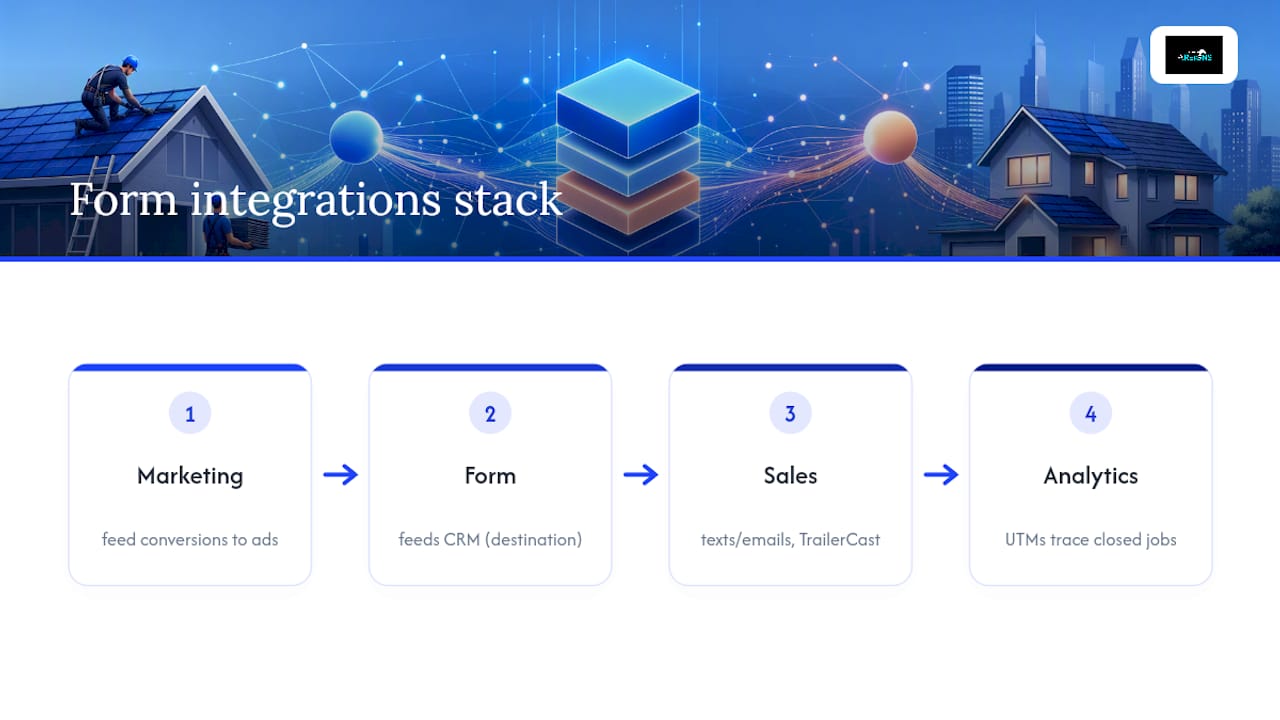
A CRM is the destination, not the whole system. The forms that generate the best roofing sales leads sit inside a wider stack that talks to marketing and sales tools on both sides of the handoff.
On the marketing side, tie form submissions to ad platforms so you can feed conversion data back into Google Ads or Meta campaigns. That closes the loop between which keywords, audiences, or creative actually produce qualified leads, not just clicks. Without this feedback, you’re optimizing for form fills instead of closed jobs, which is a common and expensive mistake.
On the sales side, integrate with tools that manage the follow-up sequence after a lead lands. Text and email automation platforms can trigger an immediate confirmation message the moment someone submits, buying time while a rep prepares to call. Video or async follow-up tools, like TrailerCast, let a rep send a personalized response fast when a live call isn’t possible right away, useful for after-hours storm leads or overflow during a busy week.
Analytics platforms round out the stack. Tagging every form with UTM parameters lets you trace a closed job back to the exact campaign, ad, and even form variant that produced it. Without that attribution layer, you’re guessing which lead source deserves more budget next month. The integration work takes setup time upfront, but it’s what separates a form that just collects submissions from one that actively improves your marketing spend over time.
Security Best Practices to Protect Lead Information
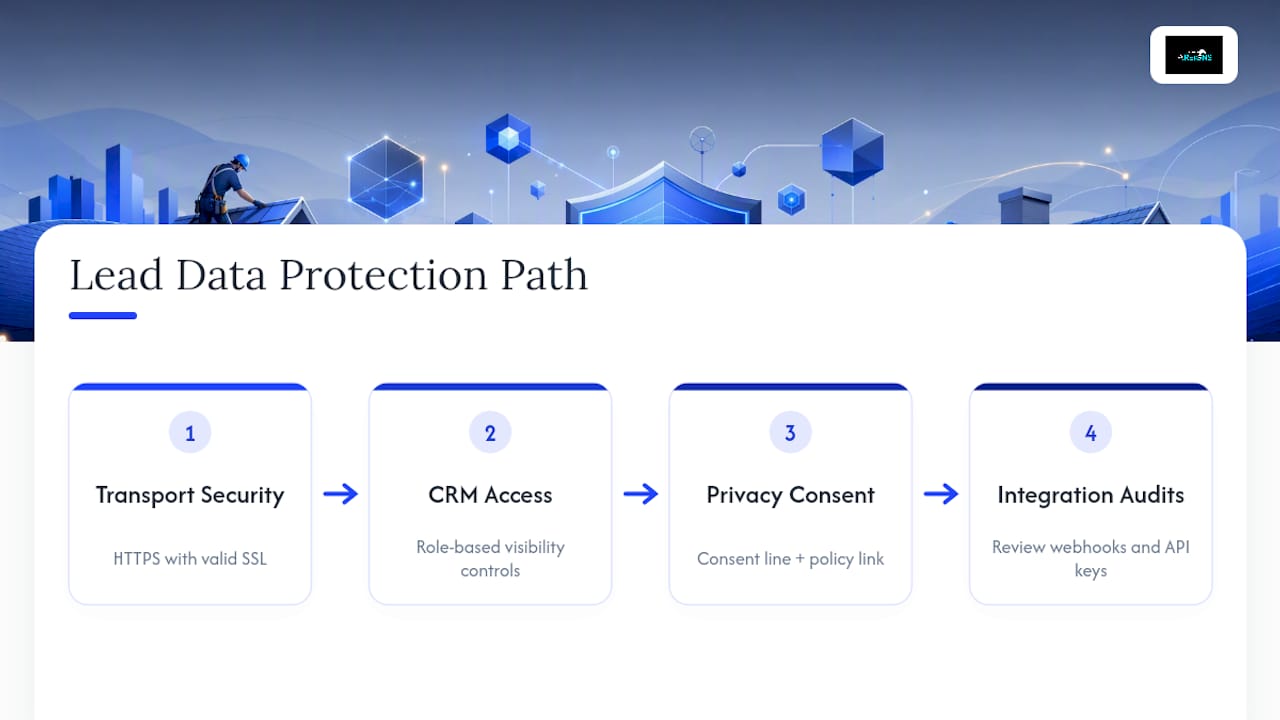
Roofing lead forms collect sensitive data: home addresses, insurance claim details, sometimes photos of storm damage tied to a specific property. That makes basic security hygiene non-negotiable, not optional.
Start with transport security. Every form should run over HTTPS with a valid SSL certificate; browsers now flag non-secure forms directly to visitors, which kills conversion before anyone even reads your first question. Most modern form builders and website hosts include this by default, but it’s worth confirming rather than assuming.
Limit who can access submitted data inside your CRM. Not every team member needs visibility into every field, particularly insurance claim numbers or financial details a homeowner may include in a description box. Role-based access keeps sensitive fields visible only to the reps and managers who need them.
Data privacy laws add another layer of responsibility. If you’re serving customers in states or regions with specific data protection rules, your form needs clear consent language explaining what happens to submitted information and how long you retain it. This overlaps with broader privacy frameworks like the California Consumer Privacy Act, which gives residents rights over how businesses use their personal data. Build your consent line and privacy policy link before you launch, not after a complaint.
Finally, audit your integrations. Every webhook, CRM connection, and third-party tool tied to your form is a potential leak point. Review API keys periodically, remove access for tools you no longer use, and never store full insurance claim numbers or financial details in plain text fields you don’t need for qualification.
What Roofing Contractors Get Wrong About Lead Forms
Most advice on lead capture treats every form the same way, optimize for conversion rate, shorten the fields, remove friction. That logic works for a lot of industries. It backfires for roofing, where a five-second-shorter form just means more unqualified leads landing in a rep’s queue at 9 p.m.
The research here points to a less popular truth: friction isn’t always the enemy. The right friction, asking about ownership or insurance status before a phone number, does more to protect a sales team’s time than any conversion-rate hack. Contractors chasing raw submission volume are usually solving the wrong problem. The goal was never more leads. It was more jobs closed per dollar spent.
Storm-response scenarios make this even clearer. A form that treats every submission with the same priority queue will lose the fastest-decaying leads, the ones with active insurance claims and visible damage, to whichever competitor answers first. Prioritization has to happen at the form level, not just in the CRM after the fact.
If you take one thing from this: stop measuring your form by how many people fill it out. Measure it by how many of those fills turn into signed jobs.
— Angel
Areions: Managed Storm-Response Lead Capture for Roofing Teams
Areions is the alternative to running your own ad campaigns and form infrastructure from scratch: instead of building screening logic, routing rules, and verification steps yourself, Areions manages the whole system and delivers human-verified, exclusive leads tied to actual storm demand straight into your CRM.
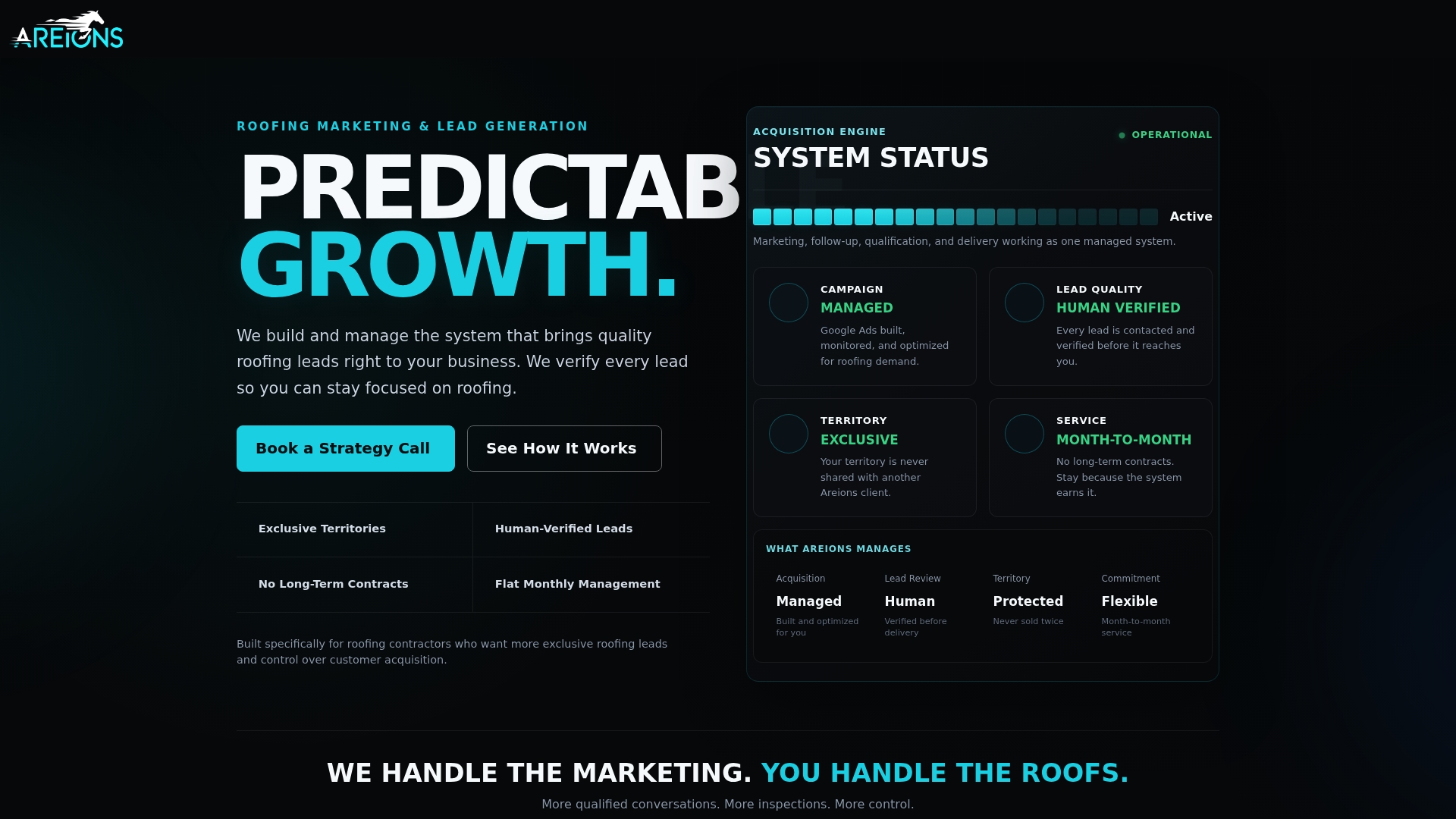
The service includes managed Google Ads campaigns, landing pages built around screening-first capture, CRM setup, automated routing, call tracking, and territory exclusivity to protect against competition within the same service area. It fits contractors seeking verified storm leads without building their own marketing team, offering a flat monthly fee alternative to per-lead pricing models.
When evaluating any managed lead provider, ask directly about verification steps, delivery latency, exclusivity terms, and contract length. Areions runs month-to-month with no long-term lock-in, starting at $97 a month on the Foundation plan, with Professional and Enterprise tiers scaling up for larger territories. If you want to see how the qualification and routing setup works for your market, book a strategy call and walk through it directly.
Sources
FAQ
What Is the Best Way to Generate Roofing Leads?
The most reliable approach combines a screening-first lead form with fast, verified routing so qualified homeowners reach a live rep within minutes, not hours. Pairing that with storm-response targeting, since active demand spikes right after hail or wind damage, tends to outperform generic evergreen campaigns because homeowners are already actively searching for help.
What Is the 25% Rule for Roofing?
The “percent rule” typically refers to insurance guidelines in some states where, if storm damage affects a substantial portion of a roof section, insurers may require replacement of the entire section rather than a patch repair. Rules vary significantly by state and insurer, so confirm the specific threshold with the homeowner’s policy or a local adjuster rather than assuming it applies universally.
What Are Lead Generation Forms?
Lead generation forms are on-page tools that collect a homeowner’s information in exchange for a quote, estimate, or callback, turning site traffic into sales contacts. The best roofing lead forms go further by screening for ownership, roof age, and insurance status before ever asking for a phone number, which filters out low-quality submissions before they reach your team.
How Much Do Roofers Pay Per Lead?
Cost per lead for roofing varies widely by market, season, and whether the lead is shared or exclusive, with storm-driven demand often commanding a premium due to urgency. Rather than chasing the lowest sticker price per lead, most contractors get better results tracking qualified cost per lead, since a cheaper lead that never closes costs more than an expensive one that does.